Star Topology: How It Works, Advantages, Disadvantages and Examples
What Is Star Topology?
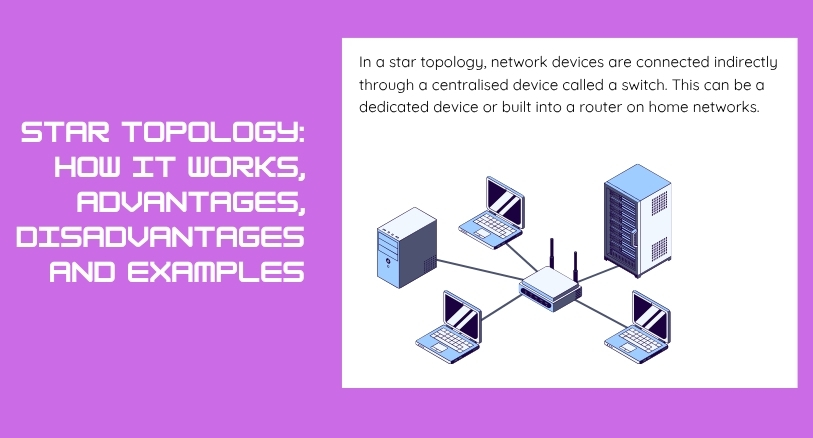
Star topology is a network topology in which every device connects to a central networking device. The central device is usually a switch, although older networks may use a hub.
Instead of connecting devices directly to one another, each computer, printer, server, or other network device has its own connection to the central device. The central device then manages communication between the connected devices.
Star topology is one of the most common network designs used in modern Ethernet networks. It is popular because it is easy to manage, simple to expand, and generally provides better fault isolation than shared-medium designs such as bus topology.
For example, in a small office, several computers may each have an Ethernet cable running to a network switch. If one computer sends data to another, the switch receives the data and forwards it toward the intended destination.
How Does Star Topology Work?
The operation of star topology is relatively simple.
Each network device has a dedicated physical connection to the central networking device. When a device wants to communicate, it sends data through its connection to the central device.
If the central device is a switch, the switch examines the destination information and forwards the data through the appropriate port.
For example, suppose four computers are connected to a switch. Computer A wants to send a file to Computer C. The data travels from Computer A to the switch. The switch identifies Computer C’s connection and forwards the data to it.
The other computers do not normally need to process that communication.
This arrangement makes communication more organized than in a traditional shared bus network.
Main Components of Star Topology
A star network contains several important components.
Central Networking Device
The central device is the most important part of the topology. In modern networks, this is usually a network switch.
The switch provides individual connection points, known as ports, for the devices on the network.
Network Devices
Computers, printers, servers, IP phones, access points, and other devices can connect to the central switch.
Each device normally has its own physical connection.
Network Cables
Ethernet cables are commonly used to connect devices to the central networking device in wired star networks.
The number and type of cables depend on the network requirements.
Network Interfaces
Each connected device needs a network interface that allows it to communicate with the network.
Modern computers often have built-in Ethernet or wireless networking capabilities.
Example of Star Topology
Imagine a small company with ten computers.
Instead of connecting every computer directly to every other computer, the company installs a network switch in a central location. Each computer has an Ethernet cable connecting it to the switch.
The switch becomes the center of the network.
If Computer A communicates with Computer B, the communication passes through the switch. If Computer C loses its Ethernet cable, the other computers can generally continue communicating.
This is a practical example of why star topology is widely used in modern local networks.
Advantages of Star Topology
Star topology provides several important benefits.
Easy to Install
The network structure is straightforward. Each device connects independently to the central networking device.
This makes installation easier to understand and manage compared with more complicated network structures.
Easy to Troubleshoot
One of the biggest benefits of star topology is easier fault detection.
If one device stops communicating, the administrator can check its cable, network interface, or switch port without necessarily affecting the rest of the network.
Good Fault Isolation
A failure in one individual connection usually affects only the device connected through that connection.
For example, if one Ethernet cable becomes damaged, other devices can continue operating normally.
Easy to Expand
Adding another device is generally simple. The new device can be connected to an available port on the central switch.
This makes star topology suitable for networks that need to grow over time.
Better Network Management
A central switch provides a convenient point for managing network connections.
Administrators can monitor ports, configure network settings, and troubleshoot connectivity from a central location.
Disadvantages of Star Topology
Star topology also has some limitations.
Dependence on the Central Device
The central networking device is a critical part of the network.
If the main switch fails and there is no redundancy, devices connected to that switch may lose network connectivity.
This is sometimes described as a central point of failure.
More Cabling
A star network can require more cable than a bus topology because every device needs an individual connection to the central device.
In a large building, this can increase installation requirements.
Higher Initial Cost
A switch and individual connections for every device add to the initial infrastructure cost.
However, the easier management and better fault isolation can make the design more practical over its lifetime.
Central Device Capacity Matters
The switch needs enough ports and sufficient performance to handle the connected devices and network traffic.
If the network grows beyond the available ports, additional switches may be required.
Star Topology vs Bus Topology
Star and bus topology use very different network structures.
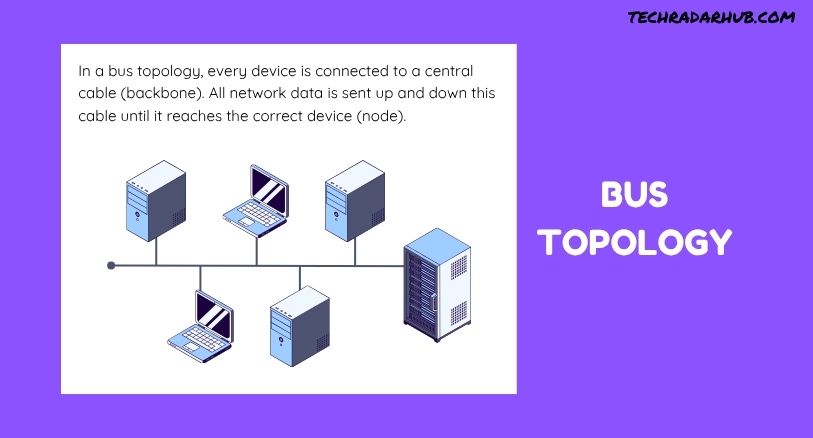
In a bus topology, multiple devices share a common backbone cable. In a star topology, each device connects separately to a central networking device.
| Feature | Star Topology | Bus Topology |
|---|---|---|
| Structure | Central device with individual connections | Shared backbone |
| Central device | Usually required | Not required |
| Fault isolation | Good | Limited |
| Expansion | Relatively easy | More difficult as the network grows |
| Cabling | More | Less |
| Modern LAN usage | Very common | Rare |
The major difference is the communication structure. Topology distributes connections through a central device, while bus topology relies on a shared communication path.
Star Topology vs Other Network Topologies
Topology is only one type of network structure. Other designs include ring, mesh, tree, and hybrid topologies.
Each design has different characteristics.
For example, mesh topology can provide multiple paths between devices, which can improve redundancy. Ring topology connects devices in a circular arrangement. Tree topology combines characteristics of hierarchical network structures.
Understanding these differences becomes easier after learning the basics in Network Topology Explained.
Where Is Star Topology Used?
Star topology is widely used in local area networks.
You can find star-based designs in:
- Homes
- Offices
- Schools
- Computer laboratories
- Small businesses
- Enterprise networks
- Data center network segments
Modern Ethernet networks commonly use switches as the central connection point.
Wireless networks can also have a star-like structure when multiple client devices communicate through a central wireless access point, although the physical and logical topology can differ depending on the network design.
Why Is Star Topology Popular?
The popularity of star topology comes mainly from its balance of simplicity, performance, and manageability.
A network administrator can add or remove individual devices without redesigning the entire network. Problems can also be isolated more easily because each device has its own connection.
The central switch provides an organized communication point, while modern switching technology allows multiple devices to communicate efficiently.
For these reasons, star topology became a practical foundation for many modern LAN deployments.
Key Characteristics of Star Topology
| Feature | Star Topology |
|---|---|
| Main structure | Central networking device |
| Common central device | Switch |
| Individual connections | Yes |
| Fault isolation | Good |
| Scalability | Good for LANs |
| Installation | Relatively simple |
| Troubleshooting | Easier |
| Cabling requirement | Relatively high |
| Modern usage | Very common |
What Happens If One Connection Fails?
One important characteristic of star topology is that individual connection failures are usually isolated.
Suppose a computer is connected to a switch using one Ethernet cable. If that cable becomes damaged, the affected computer may lose network access, but other computers connected to the same switch can continue working.
This is a major advantage over a traditional bus network, where a problem with the shared backbone can affect many connected devices.
However, the central switch remains critical. If the switch itself fails, all devices relying on that switch may lose connectivity.
Frequently Asked Questions
What is star topology?
Star topology is a network structure in which each device connects to a central networking device, usually a switch.
What is the central device in star topology?
A network switch is the most common central device. Older networks may use a hub.
Is star topology used in modern networks?
Yes. Star-based designs are widely used in modern Ethernet LANs because they are easy to manage, expand, and troubleshoot.
What is the main advantage of star topology?
The main advantage is good fault isolation. A failure in one device’s connection usually does not affect the other connected devices.
What is the main disadvantage of star topology?
The central networking device is a critical point. If it fails, devices connected through it may lose network connectivity.
Does star topology require more cables?
Generally, yes. Each device needs an individual connection to the central device, so it can require more cabling than a bus topology.
Can star topology be expanded?
Yes. Additional devices can usually be connected to available ports on the central switch. Larger networks can also use multiple interconnected switches.
What is the difference between star and bus topology?
Star topology uses a central networking device with individual connections, while bus topology uses a shared backbone cable for connected devices.

Post Comment