Bus Topology: How It Works, Advantages, Disadvantages and Examples
What Is Bus Topology?
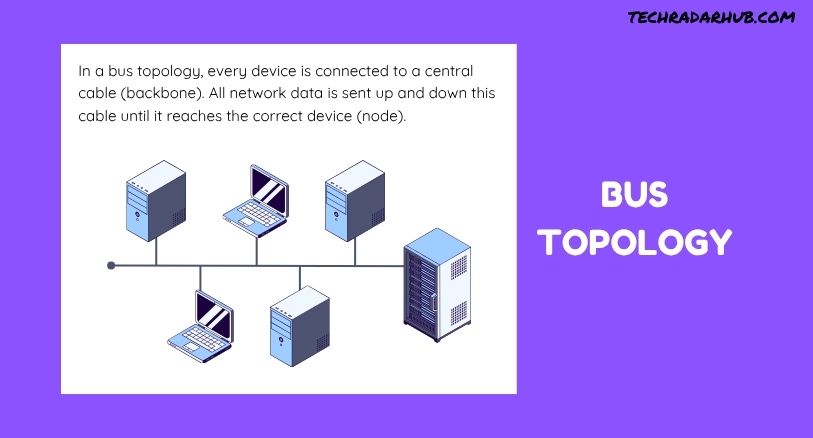
Bus topology is a type of network topology where multiple devices connect to a single main communication cable called the backbone. Data sent by one device travels along this shared cable, and the connected devices receive the transmitted signal.
Unlike a star topology, where every device connects to a central switch or hub, bus topology does not require a central networking device. The backbone acts as the primary communication path for the entire network.
Bus topology was more common in older computer networks because it was simple and inexpensive to install. Today, it is less common in modern LANs, but understanding it is still important because it explains several fundamental networking concepts.
For example, imagine a small office where several computers are connected to one long cable. When one computer sends data, the signal moves along that cable. The intended device accepts the data, while other devices ignore it.
How Does Bus Topology Work?
The basic operation of bus topology is straightforward. All devices share the same transmission medium.
A typical network contains several computers or other devices connected to a backbone cable. When a device wants to communicate, it places data onto the shared cable. The signal then travels through the network.
Each connected device checks the transmitted information to determine whether the data is intended for it. If the destination address matches, the device processes the data. Otherwise, it ignores the transmission.
Because every device uses the same communication path, only limited communication can occur at a time. If multiple devices attempt to transmit simultaneously, their signals can interfere with each other.
This is one reason older bus-based networks needed mechanisms to control data transmission and avoid collisions.
Main Components of Bus Topology
A bus network has several important components.
Backbone Cable
The backbone is the main cable connecting all devices. It carries data between the devices on the network.
The design depends heavily on this cable because it provides the shared communication path.
Network Devices
Computers, printers, and other network-enabled devices can connect to the backbone. Each device uses a network interface to communicate over the shared medium.
Connectors
Connectors are used to physically attach devices to the backbone cable. Proper connections are important for reliable signal transmission.
Terminators
Terminators are placed at both ends of the backbone cable. Their purpose is to absorb the signal and prevent it from reflecting back through the cable.
Without proper termination, reflected signals can interfere with communication and cause network problems.
Example of Bus Topology
Consider a small classroom with several older computers.
A single cable runs from one end of the room to the other. Each computer connects to this cable. If Computer A sends information to Computer D, the signal travels along the shared backbone.
Computer D receives the intended data. The other computers can see the transmission but do not process it because the information is not addressed to them.
This simple structure demonstrates how bus topology allows multiple devices to share one communication channel.
Advantages of Bus Topology
Bus topology has several advantages, particularly when considering simple or small network environments.
Simple Network Design
The structure is easy to understand. Devices connect to one shared backbone rather than requiring a separate connection to a central switch.
Lower Installation Cost
A bus network can require less cabling than some other network designs. This can make the initial installation relatively inexpensive.
Easy to Extend
Additional devices can potentially be connected to the existing backbone without redesigning the entire network.
However, adding too many devices can reduce network performance because all devices share the same communication medium.
No Central Device Required
A bus topology does not depend on a central hub or switch. This reduces the number of networking devices required for the basic structure.
Disadvantages of Bus Topology
Despite its simplicity, bus topology has several important limitations.
Backbone Failure Can Affect the Entire Network
The biggest weakness is the dependency on the main cable. If the backbone develops a serious fault, communication across the network can be disrupted.
This makes troubleshooting and physical cable maintenance particularly important.
Performance Can Decrease
As more devices are connected, more devices compete for the same communication medium. Network traffic can increase, resulting in slower communication.
Data Collisions
Because devices share one communication channel, simultaneous transmissions can cause collisions. Network protocols must manage these situations.
Troubleshooting Can Be Difficult
Finding the exact location of a cable fault can be challenging, especially when the network contains many connected devices.
Limited Scalability
Bus topology is not ideal for large networks. Increasing the number of devices and traffic levels can make the network increasingly inefficient.
Bus Topology vs Star Topology
Bus and star are two different network structures.
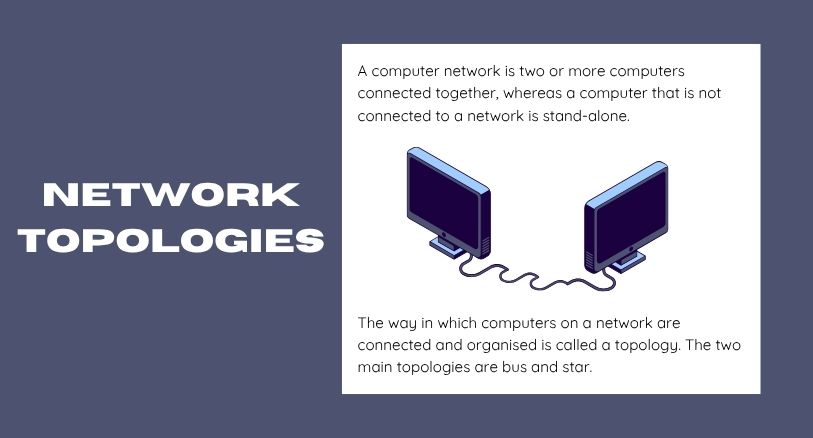
In a bus topology, devices share one backbone cable. In a star topology, each device has a separate connection to a central networking device, usually a switch.
Star topology is more common in modern Ethernet networks because it offers better fault isolation and easier management.
For example, if one cable connected to a computer fails in a typical star network, the other devices can continue operating. In a bus network, a problem with the shared backbone can have a much wider impact.
Where Is Bus Topology Used?
Traditional bus topology is uncommon in modern computer networks. Earlier Ethernet implementations used shared coaxial cable arrangements that followed a bus-like structure.
Today, most business and home Ethernet networks use switched star or extended-star designs instead.
However, bus topology remains useful for learning networking fundamentals. It helps explain shared communication media, signal transmission, collisions, cable termination, and network topology.
The concept can also appear in specialized communication systems where multiple devices share a common communication line, although the exact implementation may differ from traditional computer-network bus topology.
Is Bus Topology Still Relevant?
Yes, but mainly as a networking concept rather than the preferred design for modern LANs.
Modern networks generally use switches, structured cabling, wireless access points, and other technologies that provide better performance and scalability.
Still, learning bus topology helps beginners understand why network design matters. It also makes it easier to understand the differences between shared-medium networks and switched networks.
If you are learning network structures from the beginning, it helps to first understand Network Topology Explained and then study individual topology types.
Key Characteristics of Bus Topology
| Feature | Bus Topology |
|---|---|
| Main structure | Single backbone cable |
| Central device | Not required |
| Communication medium | Shared |
| Installation | Relatively simple |
| Initial cost | Relatively low |
| Scalability | Limited |
| Fault tolerance | Low |
| Troubleshooting | Can be difficult |
| Modern usage | Limited |
Bus Topology and Network Performance
Network performance in a bus topology depends heavily on the number of connected devices and the amount of traffic.
When only a few devices communicate, the shared cable may handle traffic reasonably well. As more devices begin transmitting data, however, contention increases.
This means network performance can decline as the network grows. It is one of the main reasons bus topology is not suitable for many modern enterprise networks.
The physical condition of the backbone also matters. A damaged cable, loose connector, or incorrect termination can affect communication across the network.
Frequently Asked Questions
What is bus topology?
Bus topology is a network structure where multiple devices connect to one shared backbone cable for communication.
Does bus topology require a switch?
No. Traditional bus topology does not require a central switch or hub.
What is the main cable in bus topology called?
The primary shared cable is called the backbone. It provides the main communication path for connected devices.
Why are terminators used in bus topology?
Terminators are placed at the ends of the backbone to absorb signals and prevent them from reflecting back through the cable.
What happens if the backbone cable fails?
A major failure in the backbone can disrupt communication for a large portion or the entire network.
Is bus topology used today?
Traditional bus topology is rarely used for modern computer LANs. Modern networks generally use switched architectures because they provide better performance, scalability, and fault isolation.
What is the main advantage of bus topology?
Its main advantages are a simple structure, relatively low cabling requirements, and the fact that it does not require a central networking device.
What is the main disadvantage of bus topology?
The shared backbone creates a major point of dependency. A backbone failure can affect the entire network, while increased traffic can also reduce performance.

Post Comment